Floating Paper Coffee Cup Mockup

Coffee cups are typically outfitted with a sleeve, a simple yet ingenious accessory designed to protect hands from the intense heat of hot beverages. However, precisely measuring and crafting these sleeves to achieve a perfect, snug fit can be surprisingly intricate.
For those with a penchant for exactitude, one approach involves delving into mathematical calculations. Applying principles of geometry can help determine the precise dimensions, including the required arc length and radii, to create a custom template. Alternatively, a wealth of visual guidance is readily available online; a quick search on platforms like YouTube will yield numerous tutorials demonstrating how to craft flawless paper cup sleeves with step-by-step instructions.
Should you prefer a more tactile and less analytical method, a straightforward manual technique offers an effective solution. Begin by taking a flexible material such as butter paper or kraft paper and carefully wrapping it around the coffee cup. Mark the desired height of the sleeve directly onto the paper. With the paper still conforming to the cup's natural curve, meticulously cut along the marked line with a knife or scissors. This method leverages the cup's own shape to create a perfectly contoured template.
Once you have your physical prototype, the next step involves digitizing it for future use and refinement. Scan the hand-cut sleeve into your computer and then import it into a vector-based design software like Adobe Illustrator or any other preferred application. Tracing this rough sketch within the software allows you to create a clean, scalable, and editable vector outline. During this tracing process, it's crucial to ensure you allocate sufficient extra space for an overlapping tab; this will serve as the pasting area when the sleeve is assembled, guaranteeing a secure and professional finish. Finally, print your perfected design, carefully cut it out, and paste it onto your cup.
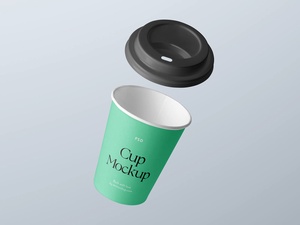
After meticulously designing your custom sleeve, showcasing it professionally is the next logical step. Today, we're excited to offer a fantastic resource: a captivating floating paper coffee cup mockup presented in a high-quality PSD format. This mockup provides an incredibly realistic and polished platform to display your unique artwork and branding.
Designed for utmost convenience, effortlessly place your designs onto the cup by utilizing the integrated smart object. This feature allows your artwork to instantly transform into a lifelike representation, providing a tangible preview of how your design will appear in a real-world context, without the need for physical prototypes.
Mockup Details:
- Available Format: Layered PSD (Photoshop Document), engineered for easy smart object insertion.
- License: This mockup is completely free for both personal and commercial use, offering full flexibility for all your projects.
- Included Files: The zip archive contains the essential Photoshop PSD Files for immediate application.
- Resolution: Boasting an impressive resolution of 6000 x 3375 pixels, ensuring crisp details and professional print-ready quality.
Simple Usage Instructions:
- Open the provided PSD file in Adobe Photoshop.
- Locate and double-click the designated smart object layer.
- Place your custom artwork or design within the smart object window.
- Save the smart object, and observe as your design is automatically applied to the floating coffee cup with realistic effects.
Software Requirement: Compatible with Adobe Photoshop CS5 and all newer versions.
Elevate your presentations and impress your audience by showcasing your coffee cup sleeve designs with unparalleled realism. Download the Coffee Cup Mockup now and bring your creative visions to life!